Device Hub DUO screenshots

I am getting an error whenever I try get a screenshot from the iPhone DUO in the Device Hub. Error is: "Cannot choose between 2 displays."

Answered by capies in 916333022

Thanks Christian. I got that working although found it a bit finicky as I prepared an app store submission. So I went back to dev 101 and reset the simulater device whcich erased all contents and started up app agin and it worked fine.

The issue seams to have been caused by "multiple app" versions seeming to be live in the simulator. No idea how that happened but happy with the solution for now and hopefully the "ghost" session bug will be resolved.

Me too, on Xcode 27.2 I'm also facing the same bug, there is the logs:

▿ DeviceKit.(unknown context at $104250fb4).ErrorDescription
  - title: "Cannot choose between 2 displays. Specify one by its unique ID:\n    35C3E68C-4D5F-4E76-B144-AA7DAF93FC23  LCD-1 (primary-1) 2007x2853\n    19A6AD7B-30C0-4F63-8685-D49A3A795962  LCD (primary) 1398x2034"
  - errorClass: "CoreDeviceError"
  - errorCode: "1010"

Hi,

I’m not sure when the error occurs. I just encountered the error myself, but I had taken some screenshots beforehand, and now it’s working again.

When the problem occurs, open the terminal and enter the following: devicectl list devices
One or more show in the 'State' column that they are connected.

Copy the UUID from the “Identifier” column.

You can get the UUID fromm the Device Hub too. On the right side in the Info section.
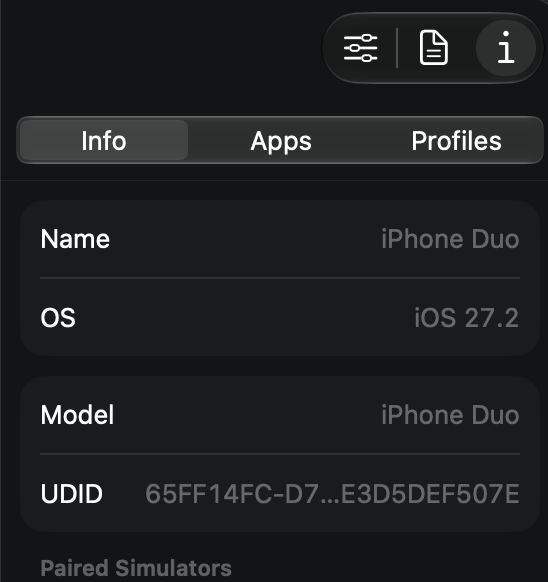
Then enter following: devicectl device capture screenshot --device <Identifier> --destination screen.png
Replace <Identifier> with your copied UUID and press enter.

The same error message may occur because the DUO has two screens, and you must select the specific screen for which you want to take a screenshot.

@reborn1991 copied the message that contains the two UUID for both screens.

Enter the following to take a screenshot of a iPhone DUO:

devicectl device capture screenshot --device <Identifier> --destination screen.png --display-unique-id <Display-Identifier>

Replace <Display-Identifier> with on of the screen UUID.

If you get a black screenshot, it means you need to change the view of your Duo in Device Hub. A screenshot can only be taken of the screen that is currently visible.

It’s quite possible that the screenshot button in Device Hub will start working again after that; that’s what happened in my case.

Christian

Accepted Answer

Thanks Christian. I got that working although found it a bit finicky as I prepared an app store submission. So I went back to dev 101 and reset the simulater device whcich erased all contents and started up app agin and it worked fine.

The issue seams to have been caused by "multiple app" versions seeming to be live in the simulator. No idea how that happened but happy with the solution for now and hopefully the "ghost" session bug will be resolved.